Zotac MCE Remote: Difference between revisions
Created page with "Category: Hardware {{versioninfo}} Category:Remote Controls Category:Input Category:Infrared *Vendors Website: http://www.zotacusa.com/zbox-ad04.html *Support..." |
No edit summary |
||
| Line 1: | Line 1: | ||
[[Category: Hardware]] | [[Category: Hardware]] | ||
{{versioninfo}} | {{versioninfo|1204Status=Working|1204UpdatedDate=10th May 2014|1204UpdatedBy=jamo}} | ||
[[Category:Remote Controls]] | [[Category:Remote Controls]] | ||
[[Category:Input]] | [[Category:Input]] | ||
| Line 10: | Line 10: | ||
===Description=== | ===Description=== | ||
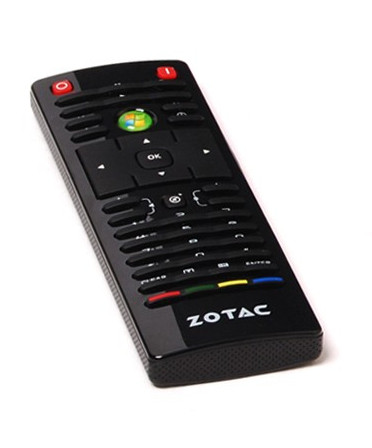
The Zotac MCE IR remote comes bundled with the Zotac Zbox ADO4. It comes with it's own receiver which I haven't been able to get working, but works well with the | The Zotac MCE IR remote comes bundled with the Zotac Zbox ADO4. It comes with it's own receiver which I haven't been able to get working, but works well with the | ||
USB-UIRT receiver using template #2287 | USB-UIRT receiver using template #2287. | ||
Just adding this to your Media Director should have it working sweetly (provided you have the USB-UIRT receiver). | |||
Buttons work pretty much as expected. The skip-track button works nicely to page down and up through the media grids. Green button selects the menu, Red exits (like Esc) | |||
[[Image:Zotac_zbox_ad04_mce_remote.jpg|link=http://www.zotacusa.com/zbox-ad04.html]] | |||
Revision as of 03:25, 10 May 2014
| Version | Status | Date Updated | Updated By |
|---|---|---|---|
| 710 | Unknown | N/A | N/A |
| 810 | Unknown | N/A | N/A |
| 1004 | Unknown | N/A | N/A |
| 1204 | Working | 10th May 2014 | jamo |
| 1404 | Unknown | N/A | N/A |
| Usage Information | |||
- Vendors Website: http://www.zotacusa.com/zbox-ad04.html
- Supported by LinuxMCE
Description
The Zotac MCE IR remote comes bundled with the Zotac Zbox ADO4. It comes with it's own receiver which I haven't been able to get working, but works well with the USB-UIRT receiver using template #2287.
Just adding this to your Media Director should have it working sweetly (provided you have the USB-UIRT receiver).
Buttons work pretty much as expected. The skip-track button works nicely to page down and up through the media grids. Green button selects the menu, Red exits (like Esc)